Track Your Office Days Effortlessly
A personal attendance tracker for hybrid workers. Know exactly how many days you've been in the office—without lifting a finger.
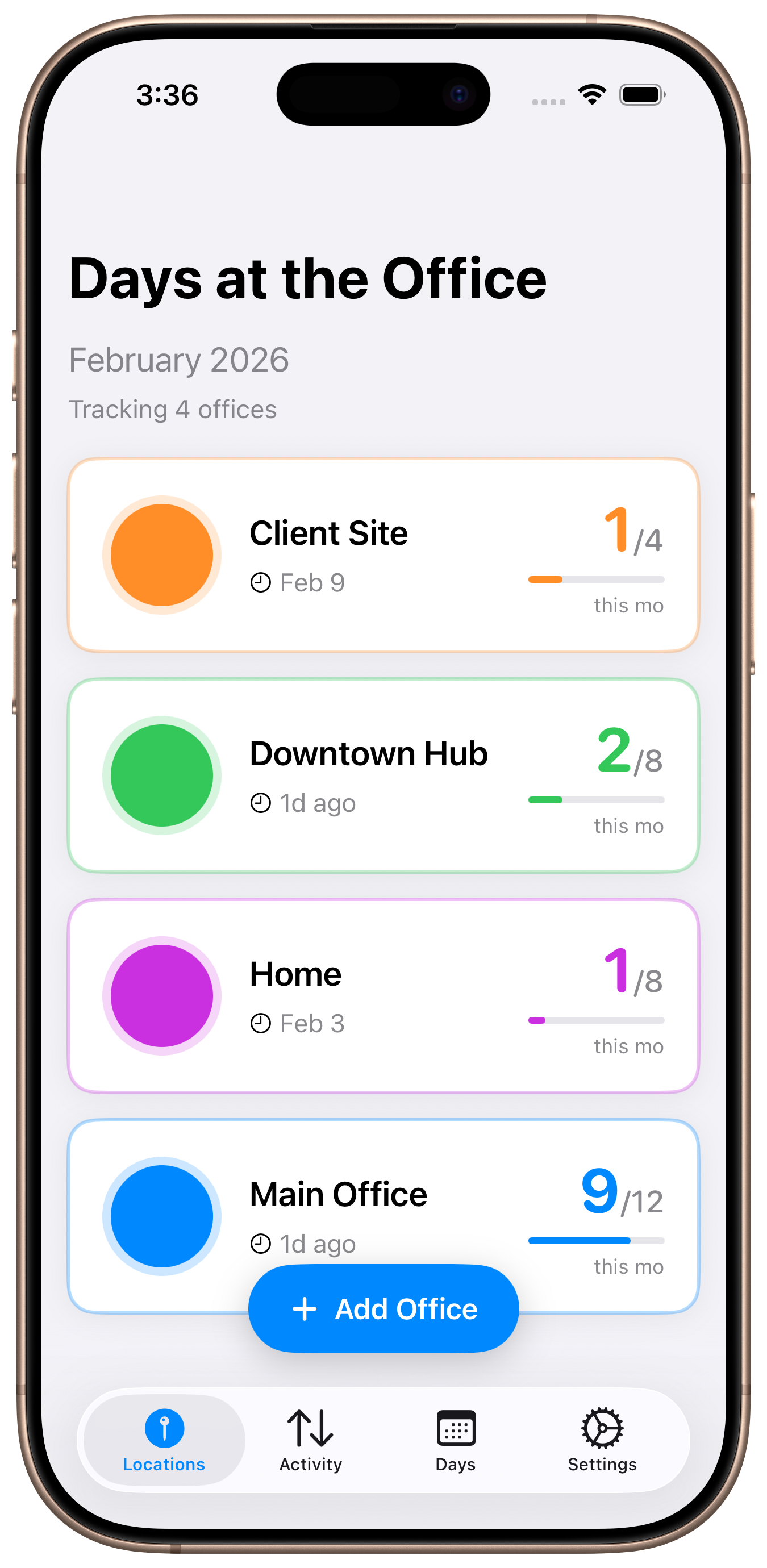
A personal attendance tracker for hybrid workers. Know exactly how many days you've been in the office—without lifting a finger.
Set up your office location once, and let the app do the rest. No manual check-ins, no time tracking apps to remember.
GPS-powered geofencing detects when you arrive and leave your office. No manual clock-in required.
Set minimum hours to count as a "qualified day." Customize what counts as a full office day for you.
View your personal attendance patterns, daily breakdowns, and monthly summaries at a glance.
All your location data stays on your device. We never upload or store your location history on our servers.
Track your time across multiple locations. Perfect if you split time between different offices or co-working spaces.
Built on iOS's native geofencing technology, using minimal battery while running in the background.
A personal tool for anyone who wants to understand their office patterns.
Stay organized with your hybrid schedule without the mental overhead of manual tracking.
Keep personal records of your on-site work across different client locations.
Start free, upgrade when you need more locations.
Forever free
Save 78% vs monthly
Cancel anytime
One-time purchase
We're here to make sure you get the most out of Days at the Office.
Have a question or running into an issue? We typically respond within 24 hours.
bestdaylabs@gmail.comFind answers to common questions about location permissions, battery usage, and tracking accuracy.
View Common QuestionsFind answers to common questions about Days at the Office.
Last updated: December 14, 2025
Best Day Labs LLC ("we," "our," or "the app") operates the Days at the Office mobile application. This Privacy Policy explains how we collect, use, and safeguard your information when you use our mobile application.
Our Privacy Commitment: Your location data is processed entirely on your device and is never transmitted to our servers. We are committed to protecting your privacy and comply with applicable data protection laws.
The app uses your device's GPS to detect when you enter and exit designated locations you configure. This location data is:
We may collect anonymous, aggregated usage statistics through Apple's App Analytics to improve app performance and user experience. This data:
If you purchase a subscription, Apple processes all payment information. We receive only:
We do not receive or store your payment card information, billing address, or full name from Apple.
For users in the European Economic Area (EEA), United Kingdom, or Switzerland, we process your data based on:
Your locally-stored location data is used solely to:
We explicitly do NOT:
All attendance records and location data are stored locally on your device in an encrypted SQLite database. Data is retained:
We do not maintain server-side backups of your personal data.
The app uses the following third-party services:
We do not integrate analytics services, advertising networks, or other third-party trackers beyond Apple's native services.
In addition to the above, you have the right to:
California residents have the right to:
To exercise any of these rights, contact us at bestdaylabs@gmail.com. We will respond within 30 days (45 days for CCPA requests).
Days at the Office is not intended for use by children under 13 years of age. We do not knowingly collect personal information from children under 13. If you are a parent or guardian and believe your child has provided us with personal information, please contact us at bestdaylabs@gmail.com, and we will assist in deleting such information.
Since all location data is stored locally on your device and never transmitted to our servers, there are no international data transfers of your location information. Anonymous analytics data may be transmitted to Apple servers located in the United States and other countries where Apple operates, subject to Apple's Privacy Policy and data protection commitments.
We implement appropriate technical and organizational measures to protect your data:
We may update this Privacy Policy from time to time to reflect changes in our practices, legal requirements, or app features. We will notify you of any material changes by:
Your continued use of the app after changes become effective constitutes acceptance of the revised Privacy Policy.
Data Controller: Best Day Labs LLC
Privacy Inquiries: bestdaylabs@gmail.com
EEA Representative: For GDPR inquiries from the EEA, please contact us at the email above.
Response Time: We aim to respond to all privacy inquiries within 30 days.
Last updated: December 14, 2025
These Terms of Service ("Terms") govern your use of the Days at the Office mobile application ("App") operated by Best Day Labs LLC ("we," "our," or "us"). By downloading, installing, or using the App, you agree to be bound by these Terms.
By accessing or using the App, you acknowledge that you have read, understood, and agree to be bound by these Terms and our Privacy Policy. If you do not agree to these Terms, you must not use the App.
We grant you a limited, non-exclusive, non-transferable, revocable license to use the App for personal attendance tracking purposes, subject to these Terms. This license does not include the right to:
You agree to use the App only for lawful purposes and in accordance with these Terms. You agree NOT to:
The App offers a free tier and paid subscription options (monthly and annual). Subscriptions provide access to premium features including support for multiple locations and advanced analytics.
All payments are processed by Apple. Refund requests are subject to Apple's refund policy. To request a refund:
We cannot process refunds directly. All refund decisions are made by Apple in accordance with their policies.
We reserve the right to modify subscription prices. Price changes will apply to new subscriptions and renewals after 30 days' notice. Existing subscribers will be notified via the App before any price change takes effect.
We may offer free trial periods for premium features. Free trials automatically convert to paid subscriptions unless canceled before the trial period ends. You can cancel at any time during the trial without charge.
Critical Disclaimer: GPS-based location tracking has inherent limitations and may not always be 100% accurate. Factors affecting accuracy include: device GPS capability, signal interference, indoor locations, tall buildings, weather conditions, and iOS background processing limitations.
The App is designed as a personal convenience tool. We recommend:
The App, including all content, features, functionality, design, software, text, graphics, logos, and trademarks, is owned by Best Day Labs LLC and is protected by United States and international copyright, trademark, and other intellectual property laws.
You are granted only the limited license described in Section 2. All other rights are expressly reserved by us.
THE APP IS PROVIDED "AS IS" AND "AS AVAILABLE" WITHOUT WARRANTIES OF ANY KIND, EITHER EXPRESS OR IMPLIED, INCLUDING BUT NOT LIMITED TO IMPLIED WARRANTIES OF MERCHANTABILITY, FITNESS FOR A PARTICULAR PURPOSE, NON-INFRINGEMENT, OR COURSE OF PERFORMANCE.
WE DO NOT WARRANT THAT:
TO THE MAXIMUM EXTENT PERMITTED BY LAW, IN NO EVENT SHALL BEST DAY LABS LLC, ITS OFFICERS, DIRECTORS, EMPLOYEES, OR AGENTS BE LIABLE FOR ANY INDIRECT, INCIDENTAL, SPECIAL, CONSEQUENTIAL, OR PUNITIVE DAMAGES, INCLUDING WITHOUT LIMITATION:
IN JURISDICTIONS THAT DO NOT ALLOW THE EXCLUSION OR LIMITATION OF LIABILITY FOR CONSEQUENTIAL OR INCIDENTAL DAMAGES, OUR LIABILITY IS LIMITED TO THE MAXIMUM EXTENT PERMITTED BY LAW. IN NO EVENT SHALL OUR TOTAL LIABILITY TO YOU FOR ALL DAMAGES EXCEED THE AMOUNT YOU PAID US IN THE PAST TWELVE (12) MONTHS, OR $100, WHICHEVER IS GREATER.
You agree to indemnify, defend, and hold harmless Best Day Labs LLC, its officers, directors, employees, agents, and affiliates from and against any and all claims, liabilities, damages, losses, costs, expenses, or fees (including reasonable attorneys' fees) arising from:
We reserve the right to:
Continued use of the App after changes to these Terms constitutes acceptance of the modified Terms. We will provide notice of material changes through the App.
We may terminate or suspend your access to the App immediately, without prior notice or liability, for any reason, including but not limited to:
Upon termination, your right to use the App will immediately cease. All provisions of these Terms that by their nature should survive termination shall survive, including ownership provisions, warranty disclaimers, indemnification, and limitations of liability.
Before filing a claim, you agree to contact us at bestdaylabs@gmail.com and attempt to resolve the dispute informally for at least 30 days.
If informal resolution fails, you agree that any dispute, claim, or controversy arising out of or relating to these Terms or your use of the App shall be resolved by binding arbitration administered by the American Arbitration Association (AAA) under its Consumer Arbitration Rules, rather than in court, except:
YOU AND BEST DAY LABS LLC AGREE THAT EACH MAY BRING CLAIMS AGAINST THE OTHER ONLY IN YOUR OR ITS INDIVIDUAL CAPACITY, AND NOT AS A PLAINTIFF OR CLASS MEMBER IN ANY PURPORTED CLASS OR REPRESENTATIVE PROCEEDING.
You may opt out of this arbitration agreement by sending written notice to bestdaylabs@gmail.com within 30 days of first accepting these Terms.
These Terms shall be governed by and construed in accordance with the laws of the State of Delaware, United States, without regard to its conflict of law principles.
Any legal action or proceeding arising under these Terms (if not subject to arbitration) shall be brought exclusively in the federal or state courts located in Delaware, and you hereby consent to personal jurisdiction and venue in such courts.
If any provision of these Terms is held to be invalid, illegal, or unenforceable, the validity, legality, and enforceability of the remaining provisions shall not be affected or impaired in any way.
These Terms, together with our Privacy Policy, constitute the entire agreement between you and Best Day Labs LLC regarding the App and supersede all prior or contemporaneous understandings and agreements, whether written or oral.
Best Day Labs LLC
For questions about these Terms of Service, please contact us at:
Email: bestdaylabs@gmail.com
We aim to respond to all inquiries within 5 business days.
Last updated: December 14, 2025
Best Day Labs LLC is committed to ensuring digital accessibility for people with disabilities. We are continually improving the user experience for everyone and applying the relevant accessibility standards.
The Days at the Office app strives to conform to the Web Content Accessibility Guidelines (WCAG) 2.1 Level AA standards and follows iOS accessibility best practices. We leverage iOS's native accessibility features including:
We welcome your feedback on the accessibility of Days at the Office. Please contact us if you encounter accessibility barriers:
Email: bestdaylabs@gmail.com
We aim to respond to accessibility feedback within 5 business days.